XactLink for non-program estimates
 Updated
by
Arianne G.
Updated
by
Arianne G.
- Overview
- Submit an XactLink request
- Track your XactLink request
- Communicate with carriers
- Maintain control of your estimate
- If your XactLink request is accepted
- If your XactLink request is declined
- Estimate agreements in XactLink
Overview
Non-program estimate workflows often require manual steps that take time away from production work. XactLink allows you to submit estimates, photos, and supporting documents directly from Xactimate to participating carriers through XactAnalysis. You can submit information through a single workflow and track the status of your submission.
With XactLink, you can:
- Submit non-program requests directly from Xactimate.
- Choose the information and documents to share.
- Track submission status.
- Communicate with the carrier in one place.
- Keep a documented history of communication and status changes.
Submit an XactLink request
Build your estimate in Xactimate as you normally do. When you submit an estimate through XactLink, select the participating carrier and choose which information to include with the request.
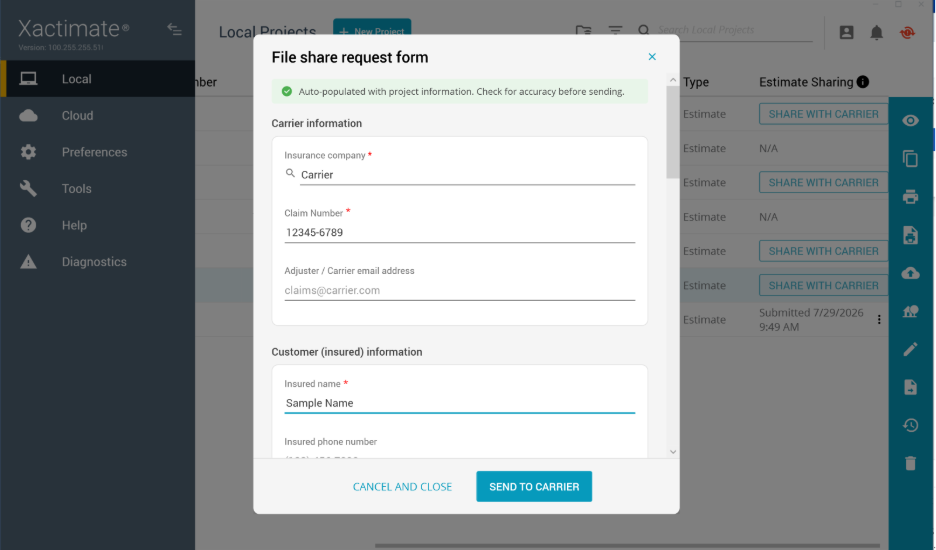
An XactLink request may include:
- Estimate data
- Photos
- Documents
- Reports or other supporting materials
- A message to the carrier
Track your XactLink request
After submitting an XactLink request, you can monitor where the request stands in Xactimate without relying on a separate email thread. Refer to the Estimate Sharing column to see the status of your XactLink request.
- Submitting: This status appears while your project is being submitted to XactAnalysis.
- Submitted: Your project has been submitted, but the carrier has not yet accepted or declined the request.
- Accepted: The carrier accepted the request.
- Rejected: The carrier declined the request.
Communicate with carriers
You can communicate with the carrier directly in the project without relying on outside methods, such as email. You do this by adding notes.
When the carrier adds a note to the project, you receive a notification in Xactimate. You can open the project in XactAnalysis SP by selecting the link in the notification, or by selecting the project in the project list and selecting the XA icon. Select the Notes tab to read messages and respond to them. Notes remain attached to the request and provide a documented history of questions and responses.
Maintain control of your estimate
You remain in control of your estimate when using XactLink. Carriers can review the information you share and request changes through messaging, but they cannot directly change your estimate.
With XactLink, you can:
- Choose what data and documents to share.
- Submit information from Xactimate.
- Track submission status.
- Communicate with the carrier.
- Withdraw an XactLink request when needed.
XactLink does not allow carriers to:
- Edit your estimate directly.
- Access information you have not shared.
- Override your estimate data, scope, or line items.
- Withdraw an XactLink request.
If your XactLink request is accepted
When a carrier accepts your XactLink request, your submitted information is attached to a non-program assignment which can proceed through the XactAnalysis workflow.
When a request is accepted:
- The request can move forward in the XactAnalysis workflow.
- Shared estimate data and supporting information remain available for review.
- The request status in Xactimate updates to Accepted.
- The carrier can communicate with you within the assignment notes.
- The carrier can agree, negotiate, or dispute the estimate agreement.
If your XactLink request is declined
A carrier may choose to decline your request for a variety of reasons.
When a request is declined:
- The submission does not move forward in the XactAnalysis workflow.
- The submission status in Xactimate updates to Rejected.
- Any communication related to the decision remains associated with the request.
- All policyholder data is removed from the carrier's view.
Estimate agreements in XactLink
After a carrier accepts your XactLink request and creates a non-program assignment, the carrier can begin recording estimate agreement updates within XactAnalysis. Estimate agreements record the agreed-upon estimate amount. You can view these updates as the assignment progresses through review and negotiation.
What is an Estimate Agreement?
An Estimate Agreement records the current level of agreement between the carrier and contractor regarding the estimate amount. Carriers use these agreement updates to document negotiations and payment discussions over time.
The available agreement types are:
- Undisputed
- Partial Agreement
- Negotiated
- Disputed
Each agreement update creates a new record so the full history of negotiations is preserved. Previous agreement records are not overwritten.
View estimate agreement updates
Once the request has been accepted, you can view estimate agreement information associated with the assignment in the Details tab.
The carrier manages these agreement updates, but the agreement history remains available for review. These records appear in the Notes and Activity Log tabs of the assignment.
Each agreement event records:
- Agreement type
- Contractor estimate amount
- Carrier-agreed amount
- Carrier user
- Timestamp
- Optional carrier note